Pricing, price lists & pricing in SAP Business One


Providing the right price at the right time to the right customer is a challenge for any business. Pricing in SAP Business One is a powerful module that goes beyond price lists.
Prices on different basis
There are several ways to create price lists in SAP Business One. To find the best way, it is important to understand your company's specific requirements and needs.
Possible options include creating price lists based on customer groups, setting special prices for certain customer groups, creating price lists based on article groups or using the integrated volume discount function. Of course, Logres can advise you on this.
Individual price lists
In SAP Business One, you can create individual price lists for items and services to offer your customers customized pricing. These price lists are integrated into sales and purchasing documents and form the basis for pricing. Conveniently, SAP Business One offers predefined price lists that you can customize according to your own preferences.
Automatic price list
SAP Business One creates and maintains two price lists automatically: "Last purchase price" and "Last determined price."
These price lists are automatically updated when an item with a new price is added to stock, or after running the Simulation Report of Stock Valuation and the Stock Control Report.
Benefits of flexible price lists
Price lists are a flexible pricing tool, allowing you to create different pricing structures for different customer groups.
For example, there are customers who have a special relationship with your company. You may be charging special customer-specific prices with them.
It is also possible to offer discounts based on the characteristics of the items sold. During sales promotions or for larger purchases, it is possible to offer discounts on the list price.
Discount groups and special prices
In SAP Business One, you can create discount groups to define discount rates based on different criteria. These discount groups take precedence over other discount types, such as time and volume discounts, and can be used to set special prices by item, business partner, date and quantity.
You can also define special prices for specific items and business partners based on date and quantity. These special prices take precedence over all other prices except framework agreements.
It is important to continually evaluate a company's specific discount and pricing strategies to ensure that they are effective and make business sense.
Pricing
There may be cases where the price calculation differs from the regular price list. For example, when special discounts are offered because of discount promotions or purchase of large volumes. Special prices may also be given to certain business partners because of their relationship with the company or because of the characteristics of the items sold.
Framework agreements
Framework agreements allow you to set negotiated item prices with a trading partner. These prices take precedence over all other prices.
During the pricing process, SAP Business One first checks whether a valid specific master agreement exists for the item. If not, it searches for special prices for business partners or item-specific prices.
If these are also not available, discount groups, time and quantity discounts and ultimately the price list are considered.
Logical order of pricing
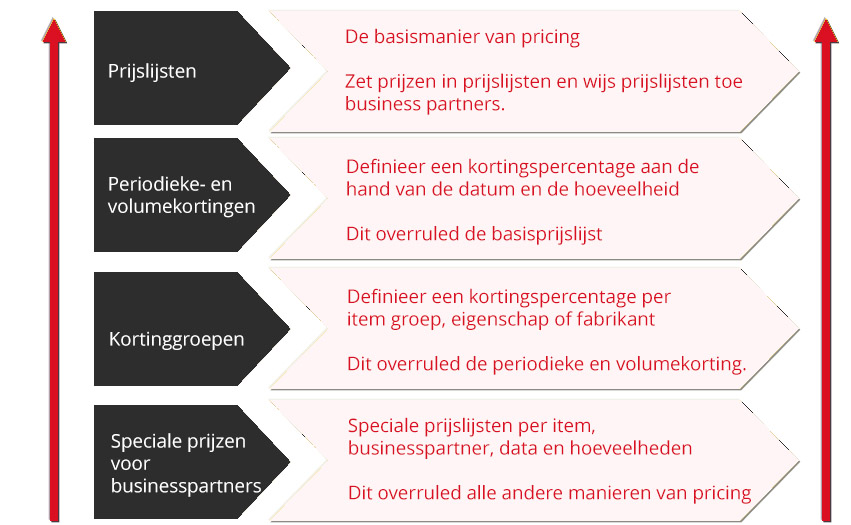
Pricing is a complex process with many factors to consider. SAP Business One provides an excellent way to organize and structure this process. But what is the optimal sequence of the pricing process in SAP Business One?
- Is there a valid, specific master agreement for the item?
- Are there special prices for business partners or an item-specific special price based on item quantity?
- Is there a discount group?
- Are there time and quantity discounts on the price list?
- Everything no? Then handle the regular price list
Linking price lists
In SAP Business One, you can link price lists by defining multipliers.
You can define item prices in one price list and then link it to other price lists. By using multipliers, SAP Business One automatically calculates the prices in each of the linked price lists.
Summary
In summary, SAP Business One Pricing is a powerful and flexible tool that allows you to efficiently and effectively manage pricing in your organization.
The module offers a wide range of features and options to ensure that you always get the right price for your products and services.
The ability to combine different pricing levels allows you to automate pricing based on complex models.